Project: Xtal
A spec-driven design tool that lives in your repo. The output is real React code
Project
Personal R&D
Stack
My Role
Concept
Designer
Architect
Builder
Contribution
Design tooling
AI workflow
Repo-native
Design systems
Prototype
Date
Q1+ 2026
Overview
Xtal is a spec-driven UI compiler with a visual editor. JSON specs are the source of truth. The compiler emits real framework code into your repo. There is no runtime renderer. The generated code is the product.
Instant design system generation
Xtal's design system bootstrap lets a project spin up a complete, themed, repo-ready design system in a session, not in weeks. The result is a design system that exists as the source of truth from day one, in the framework the team is actually using, ready to extend rather than ready to specify. Once it exists, the same DS is available across every framework Xtal emits to, without rebuilding.
Design in the repo
The canvas lives in your repo, not in a separate file format. Components come from your real component library. Tokens come from your real design system. Layouts are real layout primitives. The output is real source code in real files, committed and reviewed like any other change. No export step. No handoff document. No translation layer to clean up later. What you sketch is what gets shipped.
Spec-driven architecture
The source of truth for every screen is a JSON spec. The visual editor reads from and writes to those specs. The compiler validates them against a strict JSON Schema and walks the node tree to emit framework code. Specs are designed to be readable, diff-able, and version-controlled like any other repo artefact.
The golden triangle

One of the core ideas behind Xtal is what I describe as the golden triangle between design systems, AI and production code.
Most modern workflows still treat these as separate layers. The design system lives in Figma. AI generates disconnected outputs. Production code exists in the repo, maintained by engineering.
Xtal explores what happens when those three things become directly connected:
The design system provides the structural rules and components.
AI acts as an accelerator and assistant within those constraints.
The output is real repo-native code, not disposable mock-ups or exports.
The goal is not AI replacing designers or developers. The goal is a workflow where intent, structure and implementation stay aligned from the start.
Background

The Figma critique
I work in React. When I sketch a new screen or flow, I still want a canvas. Right now, the only viable canvas tool is Figma.
But for designers who work in code, Figma can feel like stepping back into the old world. Everything created there is ultimately throwaway work. It exists outside the product you are actually building.
Design systems get recreated in Figma, then recreated again in code. Components diverge. Flows are designed visually, then rebuilt by engineering. The artefact the designer produces is rarely the thing that ships.
That disconnect becomes even more obvious on system-heavy products:
design tokens drift
components diverge
states get lost
prototypes become disposable
handoff becomes interpretation
Figma is excellent at drawing interfaces. But drawing is not the same thing as building product structure.
What hasn't solved it
A lot of tools have tried to close that gap.
Some generate code, some provide visual builders, some attempt AI-assisted workflows.
But most still fall into one of two categories:
visual tools disconnected from production systems
code tools without a visual thinking surface
Even AI coding tools can generate components from prompts, but they still don’t give designers a proper spatial environment to sketch, structure and iterate visually.
The gap is still there.
The build
XTAL started from a simple question:
Instead of designing mock-ups and translating them later, the idea was to work directly with:
layouts
components
tokens
variants
states
application structure
The goal was to make the canvas itself structurally aware of the system it was designing for.
Under the hood
The compiler

A discovery, validate, emit pipeline. It finds every *.screen.json file, runs Ajv schema validation plus prop type-checking, and produces two files per screen: a page file at the route, and a component file under components/generated/. Output is Prettier-formatted and deterministic. Same spec in, same code out, every time.

Multi-framework emitters
The spec format and compiler pipeline are framework-agnostic. Only emitters are framework-specific. Next.js and Vue work today, with scaffolds for HTML, Svelte and Expo.
The same spec compiles to multiple frameworks via an abstract Emitter interface. Adding a new framework means writing a new emitter, not rebuilding the tool.
Component adapter system
A ComponentAdapter interface decouples Xtal from any specific component library. shadcn is the default, but the adapter pattern means any library can be plugged in. Specs reference components by name, the adapter handles imports, prop mapping and styling.
Plugin system for custom node types
A NodePlugin interface lets project teams register their own node types with prop schemas and per-emitter render logic. The toolset extends without forking the core.
Token pipeline

Style Dictionary JSON imports for spacing, sizing, colour, typography and border radius. Tokens applied in the editor compile through to CSS custom properties so the design system stays the system of record at runtime too.
PR-based publishing
The publish pipeline never writes to main. A dry-run shows the colourised diff of what would change. Commit creates a branch with only the emitted files. PR pushes the branch and opens a pull request on GitHub. Designers' work gets the same code review as any other change. This is the workflow innovation that solves a cultural problem in design / engineering collaboration, not just a technical one.
Visual editor

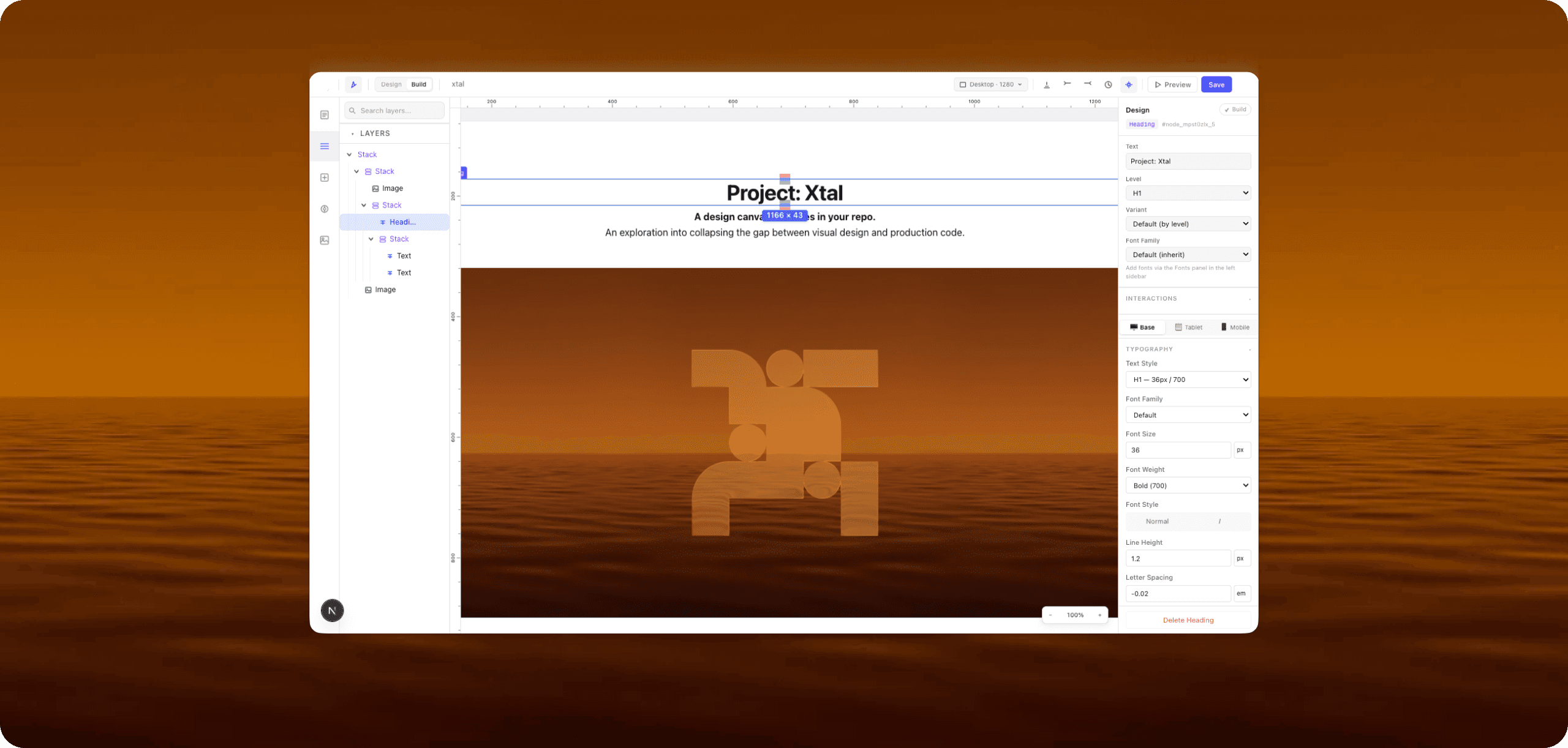
The browser-based editor at /studio has a drag-and-drop canvas, component palette, property panel, undo/redo, and a save-and-compile loop. Edit a spec, see the rendered page update instantly via Next.js HMR. 14 built-in node types covering layout, content and shipped components.
Spatial interaction model
Layout in code is three things wearing the same skin: the object, its margin, its padding. Xtal makes the distinction visible. Hover a selected node and three colour-coded hit points appear — blue for the object, orange for margin, green for padding. Drag a hit point and a block of the same colour shows the value being added in real time.
Collaboration and versioning
Multi-user projects via Supabase, role-based access (viewer / editor / admin), email invitations with pending-invite handling, project member management, and a version history panel with a colour-coded JSON diff view for comparing snapshots.
SaaS-ready architecture
The deployment model is documented end-to-end. Vercel for hosting, Supabase for auth and database, Postgres-backed (screens, design_tokens, components, project_settings), realtime ready, Tauri desktop wrapper considered for later (the Figma / Linear / Notion model).
What's incomplete
Xtal is a working prototype. Some things are deliberately rough, some are honest tech debt, and some are next on the list.
Things that work today but could be cleaner:
Several API routes use hardcoded relative paths for the monorepo root. Centralising this through studio.config.json is a small refactor away.
AI provider config (model, temperature, defaults) is inline rather than in a shared config.
Save errors log to console rather than surfacing to the user. Needs a toast layer.
Things that work today but won't scale:
The compiler does a full recompile on every save, rather than tracking spec file mtimes and only re-emitting changed screens.
The compile API shells out to ts-node via execSync, which blocks the Node event loop and re-transpiles the compiler on every run. Pre-compiling and switching to async spawn would speed this up significantly.
One bad spec aborts the whole compile. Needs per-screen error isolation so working screens still get updated.
Generated files are overwritten on every run, even when content hasn't changed, triggering unnecessary HMR reloads.
None of these block the work. All of them are honest pieces of the prototype state.
Why I'm publishing this honestly
A polished marketing case study would hide all of this. But a polished case study would also undersell what Xtal actually is, which is a working personal R&D tool that I am still using and still building. The honesty is part of the point.
Where it's heading
Xtal isn't finished. It's a tool I built for myself, that I want to keep using and keep improving as my own workflow evolves.
The near-term goals:
Make the compiler incremental so it scales as a project grows.
Tighten the AI structure-generation loop so the AI assistant stays inside the design system's constraints rather than improvising outside them.
Push more design system primitives into the spec layer (variants, states, motion) so the spec becomes a richer product artefact, not just a layout description.
Move the SaaS architecture from documented to deployed, so the tool is usable by designers without a terminal.
The bigger goal is the same one that started the work. Close the gap between design tools, design systems, AI and production code, so designers can think and ship without leaving the codebase they're already in.
That problem isn't going away. The tools we have aren't solving it yet. Xtal is one designer's exploration of how it might work.